Design Systems What a design system is, where it came from, who in a company uses one, and how it gets better.
Workhorse Collective
NameAbraham GarciaEmailabe@wrkhrs.co
ART 418 · Fall 2026
MeetsMon + WedTodaySession 15 · 10.19.2026
wrkhrs.co
The rest of the semester
What is due, from today to the last class.
Wed Nov 4Milestone 3: the brand, presented
Wed Dec 2Milestone 4: the brand book and the landing page, presented
TodayThe direction and the first rules
Mon Nov 2The system, reviewed
Mon Nov 16The brand book, drafted
Mon Dec 7, last classMilestone 4, day two. Final versions of everything, and the personal statement
Wed Oct 28The rules, written for a machine
Mon Nov 23The landing page, first build
Wed Nov 25No class, Thanksgiving
Milestones are presented to the room. Checkpoints are the smaller steps on the way to each one.
Today.
Part
What
You leave with
1
What a design system is. Its history, from IBM and NASA to atomic design and the files an AI tool reads today.
The parts of a system, and where they came from
2
How it is built today. Tailwind and shadcn/ui, the tools most websites and AI tools use now.
Semantic names, and a system an AI tool can build with
3
Who uses it. Marketing, sales, product, support, hiring, legal.
Why a business pays for a system
4
Made in loops. Iterative design, sketches, and prototypes.
How a system gets better each time it is used
5
The brand repository. The starter repository, read as a design system for one brand.
Brand first, and a brand an AI tool can follow
6
Your turn. Catch up your repository, choose one direction, and write your first rules.
The checkpoint: your direction and at least three rules, pushed
DESIGN SYSTEMS · MON 10.19 · CHECKPOINT: THE DIRECTION AND THE FIRST RULES, IN CLASS TODAY · MILESTONE 3 NOV 4
Part 1
What a design system isFrom the first printed manuals to the files an AI tool reads today.
A design system is a brand's decisions, recorded so that hundreds of people can make work that looks and sounds like one brand.
Up to now you have made one brand by hand: a pitch, a brief, boards. A company needs hundreds of people to make that brand every day, on screens and in places you will never see. The system is how they do it without you in the room.
If you have never heard the words before, that is normal. You have used dozens of design systems anyway: every Google app, every national park brochure, every bank's website.
How a design system works, in one picture.
1. You decideOut of the brief and the boards: one direction for the brand.
→
2. You write it down
Tokens: the exact values
Rules: what to do, and why
Voice: how it sounds
→
3. Other people read it
A marketer
A salesperson
A developer
An AI tool
→
4. Everything they make matches
The app
An ad
A sales deck
The website
You are in step 1 today, and you start step 2 before you leave. The yellow box is what the starter repository holds.
Words you will hear today.
Word
What it means here
Design system
A brand's decisions, written down so other people can make work that belongs to it
Token
One exact value with a name. color.action is the blue used for buttons.
Component
A part built once and used again: a button, a card, a menu
Rule
What to do, and why, for a call someone else will have to make. You write your first ones today.
Direction
The one brand you choose out of your moodboards
Repository
A project folder that keeps every saved version of every file. Yours lives on GitHub.
Commit, push
Save a version with a note about what changed, then send it up to GitHub
AI tool, skill
A program that can make things under your rules, and a written list of steps it follows
The parts of a system.Today you start the rules and the voice. Tokens are Wednesday. Components and patterns come with the landing page in November.
Part
What it is
On the invented budgeting app
Tokens
The exact values: colors, type sizes, spacing
Paper white, ink black, and one red
Components
The pieces things are built from
A button, a balance line, a weekly card
Patterns
How the pieces go together for a task
Setting up a budget in three screens
Rules
What to do, and why, for the judgment calls
Red only means overspent
Voice
How the brand sounds in writing
Plain sentences, never cheering
Who changes it
How a change gets proposed, decided, and recorded
The designer decides, and the change gets a date and a reason
The budgeting app is an invented brand, made up for class
Where design systems came from: printed manuals
It started with companies that had to look the same in a hundred places at once.
1956
IBM, with Paul Rand: one design program for the logo, the buildings, and the machines
1962
Lufthansa, by Otl Aicher's team: one of the first complete design manuals
1964
Karl Gerstner, Designing Programmes: design the rules, and the rules make the work
1970
The New York subway's sign manual, by Massimo Vignelli and Bob Noorda
1975
NASA Graphics Standards Manual, by Richard Danne and Bruce Blackburn
1977
Vignelli's Unigrid for the National Park Service: one grid for every park brochure
No need to memorize these dates. Every one of these was a binder, and when a rule changed, the page was swapped out.
"Instead of solutions for problems, programmes for solutions."
Karl Gerstner, Designing Programmes, 1964
Gerstner was a Swiss designer. He argued that a designer should write the rules that produce the answers, so other people can use them to make the work. That is the idea of a design system, sixty years ago.
Your rules file is a program in his sense: someone who never met you follows it and makes something that belongs to your brand.
You saw this manual on Sept 30. Look at what kinds of rules it holds.
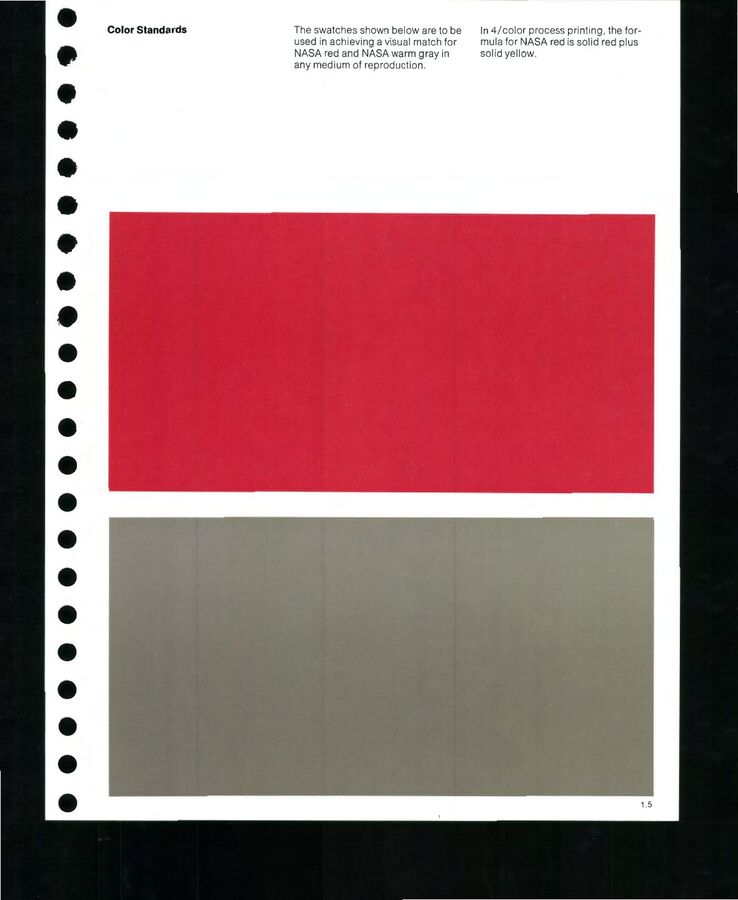
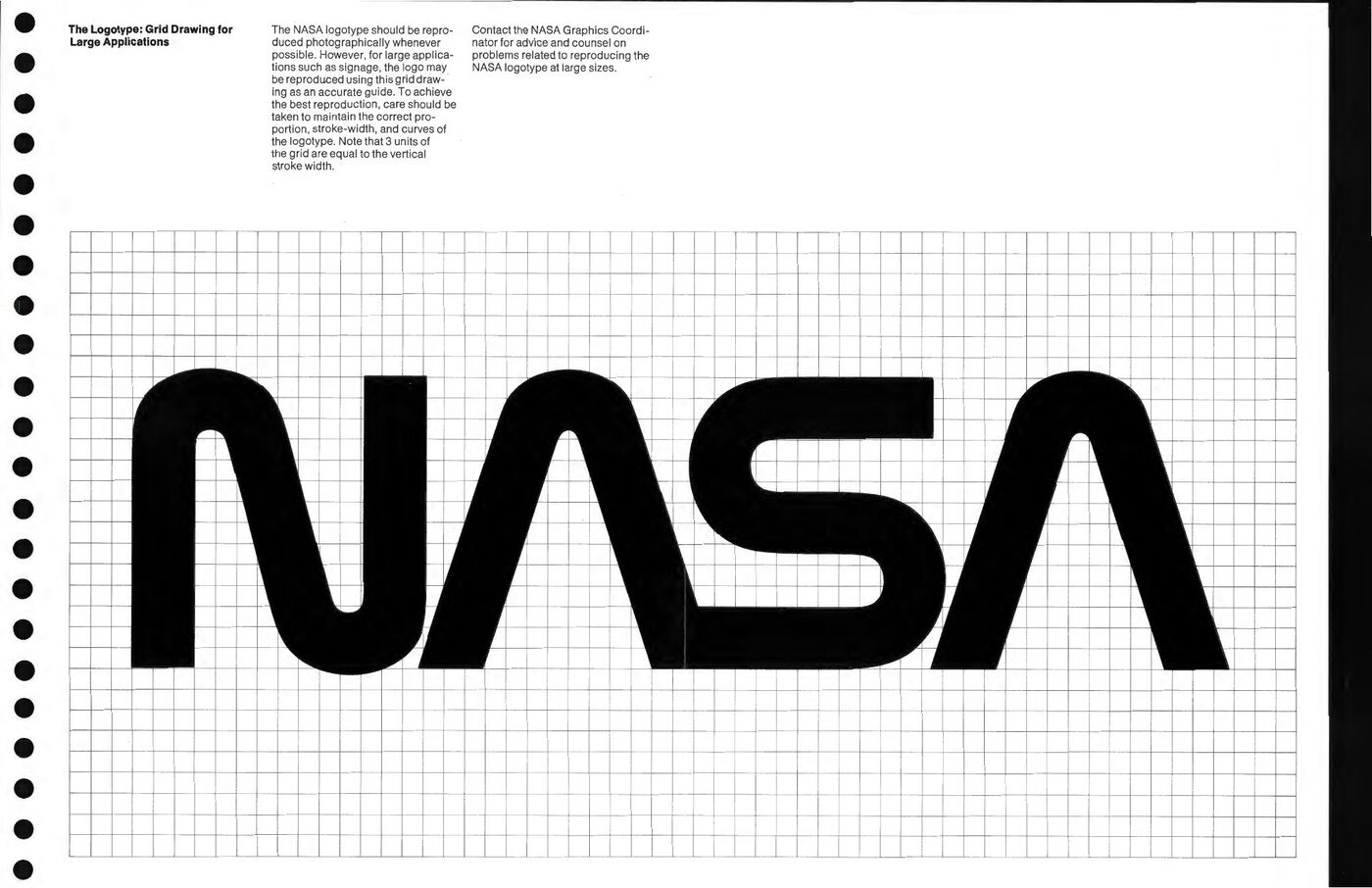
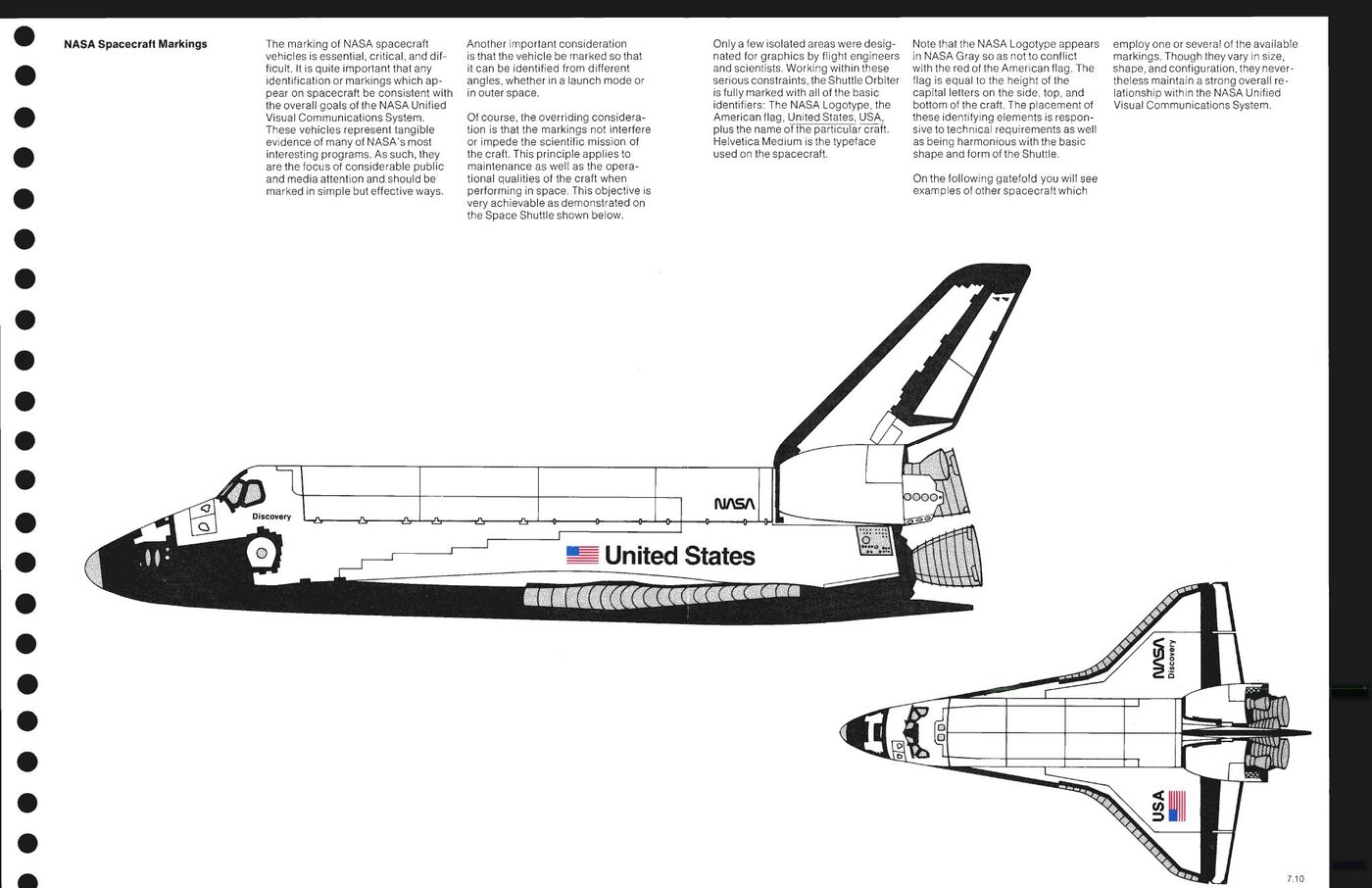
Exact valuesTwo colors, matched in any medium. Today we would call these tokens.A component, drawn exactlyThe logotype on a grid, so a sign painter can draw it at any size.A judgment, with its reasonWhere the markings go on the Space Shuttle, and why.
NASA GRAPHICS STANDARDS MANUAL · DANNE AND BLACKBURN · NHB 1430.2, PP. 9, 11, 56 · PUBLIC DOMAIN
NASA Graphics Standards Manual, 1975, page 7.10: NASA Spacecraft Markings. Richard Danne and Bruce Blackburn. Public domain.
1975 · The Space Shuttle
A rule says what to do, and it says why.
"Note that the NASA Logotype appears in NASA Gray so as not to conflict with the red of the American flag."
NASA Spacecraft Markings, page 7.10
What to do
On the Shuttle, the logotype is gray instead of red.
Why
The flag is right beside it, and two reds would fight.
What it lets you do
Someone who never met the designers knows what to do on the next spacecraft, and when the rule applies.
1977: Christopher Alexander describes design as patterns, each one a problem with its answer.An architect, he and his colleagues wrote 253 patterns for towns and buildings, from a whole region down to a window seat, in a book called A Pattern Language. Software designers borrowed the idea in 1994, and design systems still call their parts patterns.
Each of Alexander's patterns has
Each rule in your repository has
A name
A heading
The problem, and why it matters
Because: the decision or the brief section it came from
The answer, said as an instruction
Do: what to do, in one sentence
A photograph of it working
Right and Wrong: one example of each
CHRISTOPHER ALEXANDER, SARA ISHIKAWA, MURRAY SILVERSTEIN, A PATTERN LANGUAGE, 1977
Where design systems came from: screens
Then the brand moved onto screens, and the parts had to be built in code.
1987
Apple publishes its Human Interface Guidelines
2010
Responsive web design: one page that rearranges itself to fit a phone, a tablet, or a monitor
2011
Bootstrap, from Twitter, gives anyone a free kit of web parts
2013
Brad Frost names the parts: atomic design
2014
Google publishes Material Design for anyone to use
Once a page had to fit every screen, nobody could draw it just once, so designers started drawing the parts.
Why atomic design happened.
Before 2010
A designer drew each web page as one fixed picture, and a developer copied it.
2010
Responsive design meant the same page had to work on a phone, a tablet, and a wide monitor. There was no longer one picture to draw.
2012
Designers drew the parts instead. Samantha Warren's style tiles put a brand's colors, type, and buttons on one sheet before any page existed. Dan Mall's element collages did the same with pieces of real layouts.
2013
Brad Frost, a web designer, gave the parts names borrowed from chemistry. His book Atomic Design followed in 2016.
MARCOTTE 2010 · WARREN, STYLE TILES, 2012 · MALL, ELEMENT COLLAGES, 2012 · FROST, ATOMIC DESIGN, 2013 AND 2016
Brad Frost's idea: build pages from small parts, the way chemistry builds things from atoms.Fix a part once and every page that uses it gets the fix.
AtomsThe smallest pieces: a color, a typeface, a button.The red for overspent
MoleculesA few atoms that do one job together.A balance line: label, number, red when over
OrganismsMolecules joined into a section.The weekly card: five balance lines and a total
TemplatesThe layout of a whole screen, with empty slots.The home screen, before any numbers
PagesThe template with real content in it.One student's home screen, with this week's spending
BRAD FROST, ATOMIC DESIGN, 2013 · THE TALK IS WEDNESDAY'S VIDEO · EXAMPLES: THE INVENTED BUDGETING APP
The same five levels, drawn for the budgeting app.
Each level is made of the one before it. Change the red atom, and the balance line, the card, and every screen change with it.
AN INVENTED BRAND, MADE UP FOR CLASS · AFTER BRAD FROST, ATOMIC DESIGN
Where design systems came from: tokens and machines
Then companies ran their systems as products, and the exact values became data.
2014
Designers at Salesforce name them "design tokens": each exact value gets a name
2016
Airbnb describes its Design Language System
2017
Amazon's Style Dictionary: write a color once, and it comes out as code for the web, iPhone, and Android
2018
The GOV.UK Design System, for every UK government service
2019
A group at the W3C, which sets the standards for the web, starts one shared format for tokens
2023
Figma adds variables: tokens inside the design tool
2025
That format is finished. Your starter repository uses it.
2026
18 of 21 big open-source design systems ship instructions and skills for AI tools
The job stayed the same. Who reads the manual changed: a sign painter, then a developer, now a machine as well.
Part 2
How it is built todayTailwind and shadcn/ui: the tools most websites, and most AI tools, use to turn a design system into a real page.
From your decisions to a page: the four layers of a website today.
1. TokensYour brand's exact values, named for their jobs.
--color-alert --color-surface
You write these.
→
2. TailwindTurns each token into class names a page can use.
text-alert bg-surface
A free CSS framework.
→
3. shadcn/uiReady-made parts, written with those class names.
Button, Card, Dialog, Input
Free code you copy in.
→
4. The pageBuilt from the parts, so it follows the tokens.
The landing page, the app, a sign-up form
An AI tool works at every layer: it reads the tokens, writes Tailwind classes, and adds shadcn/ui parts. If layer 1 is empty, it fills it with defaults, and the page looks like everyone else's.
Every value gets three names: what it is, what it is for, and where it is used.
1. What it isThe raw value, named for how it looks.
red-600 = #D7263D
Called a primitive. Students and machines should almost never use these directly.
→
2. What it is forThe job, named for the decision.
alert = red-600
Called a semantic token. This is where your rules live: "red means overspent."
→
3. Where it is usedOne part of one component.
balance-line.over = alert
Called a component token. Big systems have these; you may not need them.
Change the brand's red: edit layer 1. Decide warnings should be orange: point layer 2 somewhere else. Nothing in layer 3 or on any page has to change.
Tailwind: the way most websites, and most AI tools, write style today.Tailwind is a free CSS framework. Instead of writing a separate style sheet, you put short class names on the HTML, and each class does one small thing.
<p class="text-lg font-semibold text-red-600">
$12 over
</p>
Class
What it does
text-lg
Large type size
font-semibold
Semibold weight
text-red-600
Text in Tailwind's red, shade 600
Each class is an atom from atomic design. When you ask an AI tool for a web page, it usually writes it this way, and if nobody gives it your colors, it uses Tailwind's built-in ones. That is part of why so many AI-made sites look alike.
TAILWINDCSS.COM · VERSION 4, 2025
In Tailwind 4, your tokens go in one block called @theme.Every variable you write there becomes a class you can use. Name them for their job, and the page says what it means.
The tokens, in your CSS file
@theme {
/* 1. what it is */
--color-red-600: #D7263D;
--color-black: #0C0C0C;
--color-paper: #FFFFFF;
/* 2. what it is for */
--color-alert: var(--color-red-600);--color-ink: var(--color-black);--color-surface: var(--color-paper);
}
The page, using them
<!-- Wrong: says how it looks -->
<span class="text-red-600">$12 over</span>
<!-- Right: says what it means -->
<span class="text-alert">$12 over</span>
<main class="bg-surface text-ink">
Popular kits built on Tailwind, like shadcn/ui, use the same idea with names such as bg-background, bg-primary, and text-destructive.
THE BUDGETING APP IS INVENTED · YOUR REPOSITORY'S 05-TOKENS/TOKENS.CSS DOES THE SAME JOB WITHOUT TAILWIND
shadcn/ui: parts you copy into your project, not a library you install.Started in 2023 by a developer who goes by shadcn. You run one command, and the part's code lands in your own folder, where you can read it and change it.
$ npx shadcn@latest add button
✔ Created components/ui/button.tsx
Each part comes with
What that gives you
Behavior
Works with a keyboard and a screen reader, from a library called Radix
Style
Written in Tailwind classes you can read
Semantic colors
Every color is a job name, like primary, never a raw value
Variants
A short list of the versions allowed, and no others
UI.SHADCN.COM · FREE AND OPEN SOURCE
shadcn/ui names every color for its job, in pairs.
The variable
Its job
background / foreground
The page, and the text on it
primary / primary-foreground
The main action, like Save, and the text on that button
secondary / secondary-foreground
A second, quieter action
muted / muted-foreground
Quiet areas, and less important text
accent / accent-foreground
Hover and highlight
destructive
Delete, and errors
border, input, ring
Lines, form fields, and the outline that shows keyboard focus
radius
How round the corners are
Every surface color has a -foreground partner, the color of the text that sits on it. A readable-text rule is built into the names.
A variant is a rule the code enforces.This is the button file shadcn/ui puts in your project, shortened. It lists every kind of button allowed. There is no seventh kind: nobody makes a purple button without editing this file.
Every color is a job name: primary, never blue-600
Your rules file says when each one is used: "destructive only for deleting"
SHADCN/UI, COMPONENTS/UI/BUTTON.TSX, SHORTENED FOR THE SLIDE
Change the variables, and every part changes with them.The same card, field, and three buttons, built from the same code. Only the variables are different.
Food budget
$72 spent of $60 this week
Weekly limit: $60
SaveCancelDelete
shadcn/ui's default theme. Gray, rounded, Helvetica-like. Every new project starts here.
Food budget
$72 spent of $60 this week
Weekly limit: $60
SaveCancelDelete
The budgeting app's theme. Paper, ink, square corners, the serif, and its red only for Delete.
THE BUDGETING APP IS INVENTED · UI.SHADCN.COM/THEMES LETS YOU TRY THIS LIVE
How an AI tool builds with shadcn/ui today.
1 · READScomponents.json where parts go, and which style the project uses
2 · ASKSthe registry what parts exist, through shadcn's own MCP server or its command line
3 · ADDSthe real code with npx shadcn add, instead of writing a button from memory
4 · STYLESwith the project's job names, bg-primary, never raw colors
5 · CHECKSthat the project still builds, and fixes what fails
"NEVER fetch raw files from GitHub manually."
From the instructions shadcn/ui ships to AI tools. It forces the tool to use the real parts instead of guessing at them: the "forbid it" and "check it" moves from the survey.
SHADCN/UI SKILL, QUOTED IN KAELIG DELOUMEAU-PRIGENT, STATE OF AI IN DESIGN SYSTEMS, JULY 2026
The catch: the same parts make the same websites.Bootstrap made the web of 2014 look alike. Untouched shadcn/ui is doing it again, and AI tools reach for it by default.
Acme AIShip faster with AI. Get started
NimbusThe platform for modern teams. Get started
LedgerlyBudgeting, reimagined. Get started
OrbitAll your work in one place. Get started
shadcn/ui gives everyone the same parts. The only thing that makes them yours is layer 1: your tokens and your rules. That is what you start today and finish on Wednesday.
FOUR INVENTED COMPANIES, DRAWN FOR CLASS
The same jobs, in your starter repository.You do not need Tailwind or shadcn/ui for this class. The starter does each job in a plain file, so you can see it.
In Tailwind and shadcn/ui
In your starter repository
Tokens in @theme, with job names
05-tokens/, with job names, starting Wednesday
Variants listed in the code
The Do line of each rule
components.json and the registry
AGENTS.md and the folder map in the README
shadcn/ui's skill for AI tools
The five skills in .claude/skills
The build check
node scripts/check.mjs
Part 3
Who uses itMost of the people who use a system work in marketing, sales, support, and the rest of the company.
Every part of a business makes something with the brand.
Who
What they make
What the system gives them
Marketing
Ads, social posts, email, the website
Campaigns that look like one brand, made in days instead of weeks
Sales
Decks, proposals, one-page summaries
On-brand work without waiting for a designer
Product and engineering
The app and the site
Parts built once and reused, so new screens cost less
Support
Help pages and replies to upset customers
Voice rules for the hard moments, when tone matters most
Hiring
Job posts and the first week for new people
The same voice inside the company as outside it
Legal
Trademarks and partner agreements
Rules for using the mark, which help the company protect it
Leadership
Announcements, reports to investors, the company's plans
A brand that stays recognizable as the company grows
Why a business pays for a system.
SpeedNobody redesigns the button. A new page is made from parts that already work, so people spend their time on the problem in front of them.
RecognitionNeumeier says a brand is a person's gut feeling about a product. That feeling builds up each time the brand shows up the same way.
ChangeWhen the red changes, it changes in one file, and every screen, ad, and deck that uses the red changes with it.
Neumeier's brand gap is the space between the strategy in the brief and the work people actually make. A system is how the strategy reaches everyone who makes something.
MARTY NEUMEIER, THE BRAND GAP · WEDNESDAY'S READING: DAVIS, CH. 9 AND 11
Change it in one place, and it changes everywhere.
The value lives in one file, and everything else points at its name. Wednesday you make this file for your own brand.
For a studio, the system is part of what the client buys.A logo is one file. A system is what lets the client's own people keep using the brand after the studio leaves. That is why your Milestone 3 is the brand presented as a system, and Milestone 4 adds the brand book and a page built from it.
Nov 4The brand, presented: the direction, the rules, the voice, the exact values.
Nov 16The brand book, drafted: the system written for a person to read.
Dec 2The landing page, built from the system, and presented with the book.
Part 4
Made in loopsTeams make a brand in rounds, and show each round to someone before they start the next.
1970: the plan that only goes one way.
Requirements
Design
Build
Test
Ship
Winston Royce, an engineer, drew this chart in a 1970 paper on building large software. Each step finishes before the next one starts. People later called it the waterfall.
"I believe in this concept, but the implementation described above is risky and invites failure."
Royce's point was that you learn the most at the testing step, when it is the most expensive to go back. He drew arrows going backward.
WINSTON W. ROYCE, "MANAGING THE DEVELOPMENT OF LARGE SOFTWARE SYSTEMS," 1970
Iterative design works in small loops, and each loop teaches you something before the next one.
MakeSomething small enough to finish this week.
ShowPut it in front of people: the room, the client, a user, or a machine.
LearnWrite down what came back, including what surprised you.
ChangeFix the work, or fix the rule that produced it, and go again.
In 2001 a group of software developers wrote this down as the Agile Manifesto. One line of it: "Responding to change over following a plan."
MANIFESTO FOR AGILE SOFTWARE DEVELOPMENT, 2001 · AGILEMANIFESTO.ORG
Bill Buxton separates sketches from prototypes.Buxton is a designer and researcher. Sketches are quick and many, and you make them to explore. Prototypes are fewer and more finished, and each one tests a single idea.
How finished
What it is
What it can tell you
A sketch
Pencil on paper, ten in an hour
Which ideas are worth one more hour
A wireframe
Boxes and words, no color
Whether people can find things
A clickable mockup
Screens linked together in Figma
Whether the steps make sense in order
A coded page
A real page built from the tokens
Whether the system holds up in the real thing
BILL BUXTON, SKETCHING USER EXPERIENCES, 2007
You have been working in loops all semester.
When
What you made
Who it was shown to, and what came back
Sept 21
The pitch, recorded
Me: comments on the problem and the audience
Sept 30
The creative brief
You, filling it in: the questions you could not answer yet
Oct 7 to 14
Moodboards and the updated deck
The room: what people asked, and what nobody asked
Today
One direction and the first rules
Me, at your desk
Oct 28
The rules, written for a machine
An AI model: whatever it gets wrong is your to-do list
Nov 4
The brand, presented
The room again
Nov 23 to Dec 2
The landing page and the book
The room, and anyone with the link
A system that changes needs a record of every change.Teams give the system a version number, write down each change with its date and reason, and keep the old versions. Then anyone can see what changed, and why, and undo it.
A version numberLike 0.1.0. It goes up each time the system changes. The starter kit went to 0.2.0 this morning.
A decision recordWhat you chose, what else you looked at, and which part of the brief it answers. Your direction file, written today, is your first one.
A logTwo lines for each class you work: what you decided, and what the machine did. It goes in LOG.md.
Part 5
The brand repositoryThe starter repository, read as a design system for one brand.
The starter repository is a design system kit for one brand, and it is public.Workhorse made it for this class and released it on GitHub, so anyone can use it for a brand project. The folders, templates, and instructions can be reused by anyone who credits them. The work you put in your copy belongs to you.
Read it the way you would read someone else's system: what does it ask you to decide, in what order, and who is it written for?
Brand first: the folders follow the order of the decisions.
Folder
The decision
When
01-brief
Who the brand is for, and what it should make them think and feel
Sept 30
02-research
What is true about the audience and the competition
All semester
03-explorations
The possible brands: boards, themes, and language
Oct 7, Oct 14
04-brand
The one direction, the rules, the voice, and the mark
Today to Nov 4
05-tokens
The exact values
Oct 21
06-book
The system written for a person to read
Nov 16
07-site
A page built from all of the above
Nov 18 to Dec 2
decks
Not a decision: every PDF you present or turn in, named with the date first
Every crit
Without your rules, a machine makes the average.AI models learn from millions of websites, so with nothing else to go on they choose what is most common. Anthropic calls this distributional convergence. Your rules are what move it off the average.
Take control of your finances!
The all-in-one platform to supercharge your budget.
Get started today
No rules. The most common choices: the Inter typeface, a purple gradient, a cheering headline.
You spent $42 on food this week.
Food$12 over
Rent$0 left
The budgeting app's rules attached. Black and paper white, one red for overspent, one plain sentence.
BOTH DRAWN FOR CLASS · ANTHROPIC, IMPROVING FRONTEND DESIGN THROUGH SKILLS, 2025 · THE BUDGETING APP IS INVENTED
The repository is also written for an AI tool, so the tool follows your brand.You don't need an AI tool today. If you use one (Claude Code, Cursor, Codex, Copilot, or Gemini), open the repository folder in it. Before it does anything, it reads AGENTS.md, its instructions, then ABOUT-ME.md, who you are, then your brief.
The tool's instructions say
What that protects
The brief is the source.
Every decision names the part of the brief it answers.
Do not decide for the student.
No invented research, quotes, customers, or sources.
Exact values live in the tokens.
No color gets typed into a page by hand.
Write in the brand's voice.
The tool reads the voice file before it writes a word.
Say what the machine did.
Every session the tool worked in ends with a log entry.
NO AI TOOL? EVERY FILE IS PLAIN TEXT YOU CAN READ AND EDIT YOURSELF
What an AI tool does in your repository, in order.
1 · READSAGENTS.md the rules for working here
2 · READSABOUT-ME.md who you are
3 · READS01-brief who the brand is for
4 · READS04-brand and 05-tokens your rules, voice, and values
5 · MAKESwhat you asked for: a headline, a page, a rule draft
6 · CHECKSscripts/check.mjs against the rules
7 · WRITESLOG.md what it did
Step 4 is the part you write, starting today. If a rule is missing or vague, the tool falls back to the average: the purple gradient and the cheering headline.
THE ORDER IS SET IN AGENTS.MD · NO TOOL? YOU CAN DO EVERY STEP YOURSELF
The tool can suggest a change to the brand. Only you can make it.When you correct the tool's writing the same way twice, it adds a line to 04-brand/voice-queue.md. You read that file and decide what becomes a rule.
Date
Proposed rule
Why
Source
Oct 28
Never call the user "budgeter"; say "you"
Corrected twice in the welcome screens
The tool
Oct 29
Adopted into the voice rules, revision 2
The student agreed
The student
An invented example, on the invented budgeting app
Five skills: steps the tool follows, written down once.A skill is a short text file of instructions. In Claude Code you ask for one by name, or just describe the job: "help me write a rule for my color."
Skill
What it does
Write rules
Asks you about one decision and writes your answers into the four parts of a rule. It never fills a part with its own guess.
Write in voice
Reads the voice rules before writing any copy for the brand
Check
Reads a draft for the habits that make writing sound machine-made, and flags them
Trace to the brief
Lists every decision in the work and the words in the brief it answers, and flags what answers nothing
Log the run
Writes the log entry: what was decided, and what the machine made, kept, and threw out
IN .CLAUDE/SKILLS IN YOUR REPOSITORY · BY NOV 2 YOU WRITE ONE OF YOUR OWN, PART OF THAT DAY'S CHECKPOINT
Four ways real design systems keep a machine on-brand.
Way
What it means
A real system that does it
In your repository
Tell it
Instructions the tool reads before it starts
Ant Design keeps one instruction file that every AI tool reads
AGENTS.md
Show it
Examples of the right answer
Cloudscape, Amazon's system, publishes 181 example pages for tools to copy
The Right line in every rule
Forbid it
Say what never to do
HeroUI's instructions open: "STOP. What you remember is WRONG."
The Wrong line, and "never"
Check it
Test the result and send back what fails
Ant Design runs its checker after every change the tool makes
scripts/check.mjs, and you
The survey's finding: checking beats forbidding. A tool can ignore a "never." It cannot ignore a check that fails.
KAELIG DELOUMEAU-PRIGENT, STATE OF AI IN DESIGN SYSTEMS, 21 SYSTEMS, JULY 2026
Name a value for its job, and the look can change later.A preview of Wednesday. A token is one exact value with a name, kept in the 05-tokens folder. Figma can read the same file.
color.actionThe one call to action on a screen. If it changes from blue to red, the name still fits.
color.blueSays what it looks like. The day it turns red, every page that uses it is wrong.
A descriptionEvery token says what it is for: "The one call to action per view."
The repository checks itself.One command reads the whole system and lists what breaks its own rules. You don't need it today: we run it together on Wednesday, and after that before every commit.
node scripts/check.mjs
Contrast
ok color.ink on color.surface: 17.40 to 1
Site
FAIL site.css types values by hand: #fff, 12px
Rules
FAIL "Red means overspent" points at
color.alert, which is not in 05-tokens
What it checks
Every token says what it is for
The CSS says the same thing as the token files
Text is readable on its ground
The site types no colors or sizes by hand
Every rule has Do, Because, Right, and Wrong
What makes a repository easy for someone else to pick up.
Habit
In the starter repository
Tell people where to start
The README has the steps and a map of every folder
Say what others may do with it
The license: reuse the kit with credit; your work stays yours
Use plain text
Every file is text or JSON, so any person or tool can open it
Keep one home for every value
Colors live only in the tokens, and the page reads them
Commit small, and say why
One change per commit, with a message that says what and why
Keep receipts
The log, the direction file, and the voice queue
Part 6
Your turnCatch up your repository, choose one direction, and write your first rules.
Your work lives in three places. Here is how it moves.
Seven steps, one slide each. Do each step before the next slide, and raise your hand if what you see does not match the box on the right.
In the Finder window from step 4, double-click the decks folder.
Drag in three PDFs: your creative brief, your moodboards, and your October 14 deck.
Rename each one, date first. Click the name once, press Return, type, and press Return again.2026-09-30-creative-brief.pdf 2026-10-07-moodboards.pdf 2026-10-14-explorations.pdf
You should see
Three PDFs in decks, sorted by date, plus the README.md that was already there.
Go back to GitHub Desktop. The left column lists every file you changed.
At the bottom left, in the Summary box, type: Move work into the starter repository
Click the blue Commit to main button.
Click Push origin at the top of the window.
You should see
GitHub Desktop says No local changes again.
On github.com, reload your repository page: your PDFs are in decks.
If it goes wrong
The button says Publish branch or Fetch origin instead? Click it; it does the same job.
Choose one direction: hold each board up to your brief.
Reread your brief: who the brand is for, and what they should think and feel.
Hold each board up to those words. Which one answers the most of them?
Read your notes from Oct 14. What did the room ask, and what did it miss?
Pick one, and write it in one sentence.
For each board you did not pick, write down what it would have cost you.
The invented budgeting app, choosing between three boards.
Board
What it looks like
Held up to the brief
The coach
Bright green, progress rings, and messages that cheer you on
It looks like every other budgeting app, and the brief says that tone makes students feel judged.
The ledger
Black and paper white, plain numbers, and no cheering
It answers "calm" and "plain" in the brief, and it talks like a friend who is good with money.
The arcade
Game colors, points, and levels for saving
Fun the first week, but it makes money feel like a game, and the brief asks for trust.
The direction in one sentence: a budgeting app in black and paper white that tells students where their money went, plainly, and never cheers.
An invented brand, made up for class
Then turn it into rules. Every rule has four parts.Today, write all your rules under Judgment rules in 04-brand/rules.md, in words. On Wednesday your color and type rules get a token and move up to Exact rules.
Part
What it says
The invented budgeting app
Do
What to do, in one sentence
Use black and paper white on every screen. The only other color is one red, for money you have overspent.
Because
The decision or the part of the brief it came from
The direction: calm and plain. The brief: students feel judged by cheerful green apps.
Right
One example that follows it
A balance in black on paper white, with the overspent amount in red.
Wrong
One example that breaks it
A green progress ring with confetti when you save.
An invented brand, made up for class
"Keep it friendly" is still a wish.Nobody could tell you whether they followed it. Here is the same idea written so someone could.
Do
Say what happened in one plain sentence. Never use an exclamation mark.
Because
The direction: it talks like a friend who is good with money.
Right
"You spent $42 on food this week."
Wrong
"Whoa! Big week for snacks!"
Three questions for every rule: could someone who never met you follow it, could you tell if they broke it, and does it name where it came from?
04-brand/direction.md Before, and after it is filled in
What you find in the file
**Chosen on:** (date)
**The direction in one sentence:** (if it takes
more than one breath to say, it is two directions)
**Which board or theme it comes from:** (its name)
## Which words of the brief it answers best
-
## The alternatives, and what they would have cost
| Board or theme | What it would have cost |
|---|---|
| | |
The invented budgeting app, filled in
**Chosen on:** 2026-10-19
**The direction in one sentence:** A budgeting
app in black and paper white that tells students
where their money went, plainly, and never cheers.
**Which board or theme it comes from:** The ledger
## Which words of the brief it answers best
- Brief 5, Insight: students feel judged by
cheerful, colorful budgeting apps.
## The alternatives, and what they would have cost
| Board or theme | What it would have cost |
|---|---|
| The coach | Looks like every other app |
| The arcade | Makes money a game; the brief asks for trust |
AN INVENTED BRAND, MADE UP FOR CLASS · YELLOW MARKS WHAT YOU TYPE
### Black and white, and one red
- **Do:** Use black and paper white on every
screen. The only other color is one red, for
money you have overspent.
- **Because:** The direction: calm and plain.
Brief 5: students feel judged by cheerful
green apps.
- **Right:** A balance in black on paper white,
with the overspent amount in red.
- **Wrong:** A green progress ring with confetti
when you save.
AN INVENTED BRAND, MADE UP FOR CLASS · YELLOW MARKS WHAT YOU TYPE
On github.com, on your repository's page, copy the address from the browser's address bar.
On Blackboard, open ART 418, then Course Content, then Checkpoint: The direction and the first rules.
In the text box, paste three things: the address, your direction sentence, and your AI note.The AI note: which tool you used and for what, or "I did not use AI today."
Click Submit by 2:50.
You should see
Blackboard shows the checkpoint as Submitted.
Today's checkpoint: what I look for.
In your repository
What it holds
decks/
The brief, the moodboards, and the Oct 14 deck as PDFs, date first: 2026-10-14-explorations.pdf
01-brief/creative-brief.md
Your brief's answers as text
04-brand/direction.md
Your direction in one sentence, the brief's words it answers, and what the others would have cost
04-brand/rules.md
At least three rules under Judgment rules, each with Do, Because, Right, and Wrong
LOG.md
An entry for today: Decided, and Machine
Blackboard
"Checkpoint: The direction and the first rules": your repository link and your direction sentence in the text box, and the AI note, by 2:50 today
Before Wednesday.
What
What to do
Due
Read
Davis, Creative Strategy and the Business of Design, chapters 9 and 11: leading the client, and aligning the target, the channel, and the message. About 20 pages.
Oct 21
Watch
Brad Frost, Atomic Design, about 30 minutes, at vimeo.com/109130093: today's atoms and molecules, from the person who named them.
Oct 21
Bring
Your laptop and your repository. On Wednesday we take a brand apart into exact values for color, type, and spacing, and you do the same to yours.
Oct 21
THE READING AND THE VIDEO ARE LINKED ON BLACKBOARD AND ON THE COURSE PAGE
The next three weeks, up to Milestone 3.
Class
What we do
Read or watch before class
Due
Wed Oct 21
Tokens and rules. We take a brand apart into exact values for color, type, and spacing, and you do the same to yours.
Davis, chapters 9 and 11, about 20 pages. Brad Frost, Atomic Design, video, 30 minutes.
Nothing turned in
Mon Oct 26
Voice and language. How the brand sounds, what it is called, and the rules for its writing.
Eli Altman, Don't Call It That, the opening sections through the first naming exercise, 24 pages.
Nothing turned in
Wed Oct 28
Testing the system with AI. You give your rules to an AI model with nothing else attached, and read what comes back.
Ted Chiang, "Why A.I. Isn't Going to Make Art," The New Yorker, about 25 minutes.
Checkpoint: the rules, written for a machine
Mon Nov 2
System review. The whole system read as one thing, then studio time on the brand.
Ian Silber on Lenny's Podcast, video, 55 minutes. John Berger, Ways of Seeing, episode 4, 30 minutes.
Checkpoint: the system, reviewed, in class, with one skill you wrote
Wed Nov 4
Milestone 3: the brand, presented. Boards up before class starts, then three minutes each.
Nothing new
A mark, a palette, the type, the voice, and three applications, with your deck rebuilt
AFTER NOV 4 · NOV 16 · THE BRAND BOOK, DRAFTED · DEC 2 · MILESTONE 4, THE BRAND BOOK AND THE LANDING PAGE
Close
Choose one brand. Then write down how to make it."The NASA Logotype appears in NASA Gray so as not to conflict with the red of the American flag." NASA, 1975.
 wrkhrs.co