Capture and Check-in ART 220 · Digital Illustration · Session 12
Workhorse Collective
NameAbraham GarciaEmailabe@wrkhrs.co
ART 220 · Fall 2026
Today10.01.2026TopicYour black and white drawing becomes a scan, and the color, shadow and texture go on in Photoshop or Illustrator. Where everyone stands, and the two weeks left.
wrkhrs.co
Session 12
Your drawing is black and white. Today it goes into the computer, and the color starts.
01 · The schedule
Two weeks and a break until the poster is due on Oct 15. What happens on each of the four days left.
02 · Where you are
Everyone says which step their poster is on. Then you know what Tuesday asks of you.
03 · Scan it
Your ink drawing in as a clean black and white image: black line, white paper, nothing in between.
04 · Exercise 5
Color your scan on the computer: the black line stays on top, the color goes under it. Then work time with desk visits.
How this poster is made
Ink on paper, color on the computer.
What happens
What it looks like
01 · On paperby hand · done today
The drawing in black ink: the line, the words if you drew them, any hatching you want kept. No color on the paper.
Black ink on white paper
02 · The scantoday, in class
Scanned at 600 ppi and cleaned until the ink is pure black and the paper is pure white.
A black and white image
03 · On the computertoday through Oct 15
Color under the line, then shading, texture with the brushes you made Tuesday, and refining until it holds together.
The poster
THE LINE NEVER CHANGES AFTER THE SCAN. EVERYTHING YOU ADD GOES ON A LAYER UNDER IT.
01 · The schedule
Four class days and a break until the poster is due.
Day
In class
Due at the start
Thu Oct 1today · session 12
Scan the black and white drawing and start coloring it on the computer. Exercise 5.
Check-in 2: the finished drawing
Tue Oct 6session 13 · coloring and refining
A full working day on the computer: color, shading, texture, refining. Desk visits.
Your colored file from today
Thu Oct 8session 14 · wall and phone test
Print the poster on letter paper and pin it up. Read it from the back of the room and on a phone, and fix the one thing that fails. Last class before the break.
A poster you can print
Tue Oct 13fall break
No class. This is finishing time.
Thu Oct 15session 15 · critique
Full critique, each print next to its original drawing. Project 3 is assigned at the end.
Project 2, final
THE DUE DATES STAY WHERE THEY ARE. IF YOU ARE BEHIND, WE CHANGE YOUR PLAN TO FIT THEM.
02 · Where you are
Say which step your poster is on.
Where you are
Today
Before Tuesday
Still on the thumbnailnothing on the full sheet
Draw for the whole work time. Scan the sheet at the end, as far as it got, and do Exercise 5 on that scan.
Finish the drawing, scan it at 600 ppi, and color it again. A desk visit with me today.
Drawn, not finishedpencil on the full sheet, not all inked
Scan what you have and do Exercise 5 on it. Then back to the drawing.
Finish the ink, scan it again, and move your color layers under the new scan.
Finished on paperinked, lettering in if it is drawn
Scan it, clean it to black and white, and do Exercise 5.
Every shape colored.
Already scanneda clean file at 600 ppi
Exercise 5 first. Then keep going: shading and texture under the line.
Color finished, shading started.
ONCE AROUND THE ROOM. ONE LINE EACH: YOUR STEP, AND WHAT IS IN THE WAY.
Scan itThe goal is a black and white image: black ink, white paper, nothing in between. Scan at 600 ppi, grayscale, the same steps as session 9.
THE FULL STEPS ARE IN THE SESSION 9 SLIDES · /LECTURE/ART220-CAPTURE.HTML
03 · Scan it
From paper to a black and white image.
00 · Save the scanTIFF or PNG, untouched
Name it lastname-p2-scan.tif and leave it alone. If the clean-up goes wrong, you start again from this. Never scan to JPEG.
01 · Straighten and cropCrop tool · C, then Straighten
Draw the straighten line along the sheet's edge, then crop to the drawing.
02 · White pointLevels adjustment layer
Pull the white input slider left until the paper is white.
03 · Black pointsame Levels layer
Pull the black input slider right until the ink is solid black. Stop when the thin lines are solid, or your hatching closes up.
04 · Clean by handBrush · B, in white
Paint out the specks Levels left. No filters: a speck of dust and a stipple dot are the same size.
05 · Separate the lineits own layer, set to Multiply
Copy the black and white line to its own layer at the top, set to Multiply. The white drops out and only the ink is left. Exercise 5 starts here.
BIGGER THAN THE SCANNER BED? SCAN IT IN TWO HALVES WITH AN OVERLAP, THEN FILE › AUTOMATE › PHOTOMERGE.
03 · Scan it
If you are not finished today, scan it before Tuesday.
Color is $0.25 a page on letter paper, which is the size of the wall test on Oct 8. You need a student print account, funded through MyCSU. No printing straight from a laptop: use a library computer.
Photoshop and Illustrator are on the art department lab computers, for Exercise 5 and all the coloring after it.
THE LIBRARY HAS ONE SCANNER. DO NOT LEAVE IT FOR MONDAY NIGHT.
04 · Exercise 5
Color your black and white scan on the computer.
01 · It is your poster
There is no separate exercise file. Exercise 5 is today's step on your own poster: the drawing scanned in, and the color started.
02 · The line on top
Your black and white scan on its own layer at the top, set to Multiply. You never paint on it.
03 · Color under it
Every shape filled in your poster's colors, on named layers under the line. No white showing along the line.
04 · Hand in
The layered PSD or AI and a JPEG of it, before the end of class. Graded today on the 0 / 2 / 3 scale.
04 · Photoshop
The line sits on top. The color goes under it.
1 · Name the scanLayers panel
Open your clean scan. Double-click its layer and name it line.
2 · Set it to Multiplythe menu at the top of the Layers panel
Now the white of the paper covers nothing. Only the black line shows over whatever is underneath.
3 · Add a layer under itCmd Shift N
Drag the new layer below line and name it color.
4 · Fill one shapeMagic Wand · W
Click the line layer, then click inside a shape. Click the color layer and press Alt Delete to fill it. Do the next shape.
IF THE WHOLE PAGE FILLS, THE SHAPE HAS A GAP IN ITS LINE. CLOSE IT WITH A BLACK BRUSH ON THE LINE LAYER.
04 · Illustrator
The same idea in Illustrator.
1 · Place the scanFile › Place
Your clean black and white scan, on the artboard.
2 · Turn it into shapesWindow › Image Trace
Preset Black and White Logo, tick Ignore White, then Expand. Your line is now vector shapes.
3 · Make it paintableObject › Live Paint › Make
With the line selected. Every closed shape inside it can now take a color.
4 · Fill one shapeLive Paint Bucket · K
Pick a color and click inside a shape. Do the next shape.
IF A COLOR SPILLS INTO THE NEXT SHAPE, THE LINE HAS A GAP THERE. CLOSE IT, OR WORK IN PHOTOSHOP.
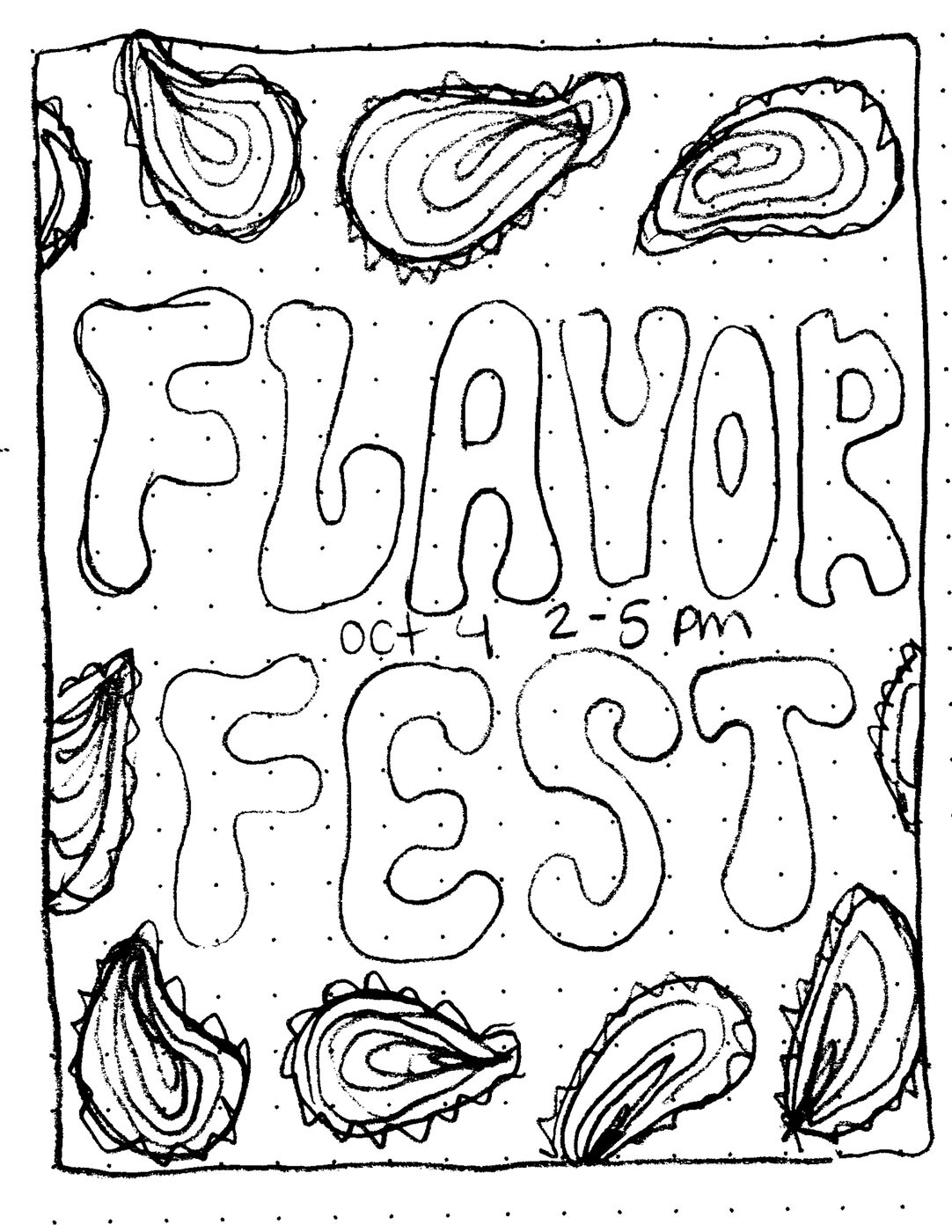
One thumbnail, four toolsA thumbnail from Tuesday's class, run through Krea, Gemini, ChatGPT and Claude. The same sketch every time.
FLAVOR FEST · CHARLESTON · OCT 4
Four tools · the sketch
The sketch, and what each tool was asked.
The thumbnailBlack ink on paper, scanned
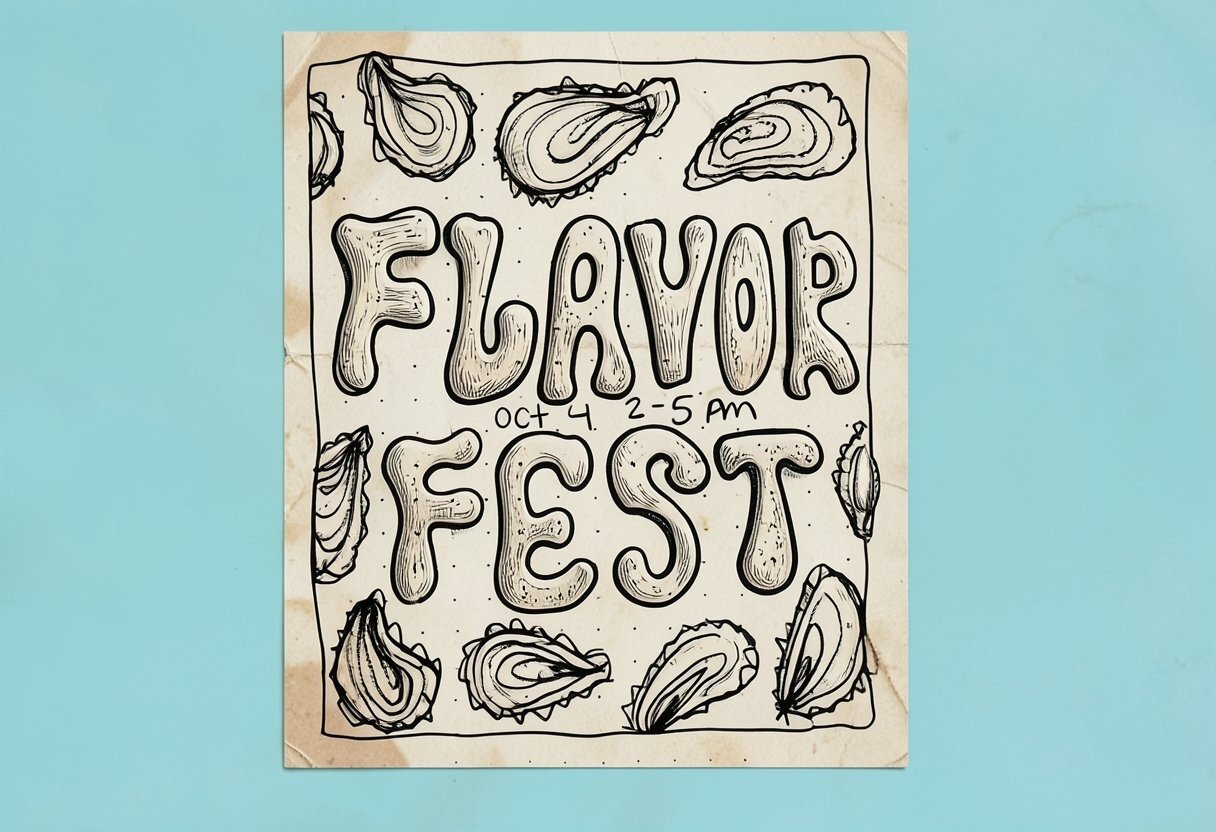
Krearealtime, from the sketch
festival poster, lowcountry charleston, handrawn lettering, illustration, oysters
Geminione line
Using the attached sketch as the exact layout, create a finished poster for a food festival in Charleston, South Carolina.
ChatGPTone line
The same sketch and the same line as Gemini.
Claudeafter Gemini
Keep the drawn oysters. Make the lettering consistent and keep it hand-drawn.
Four tools · Krea
Krea.
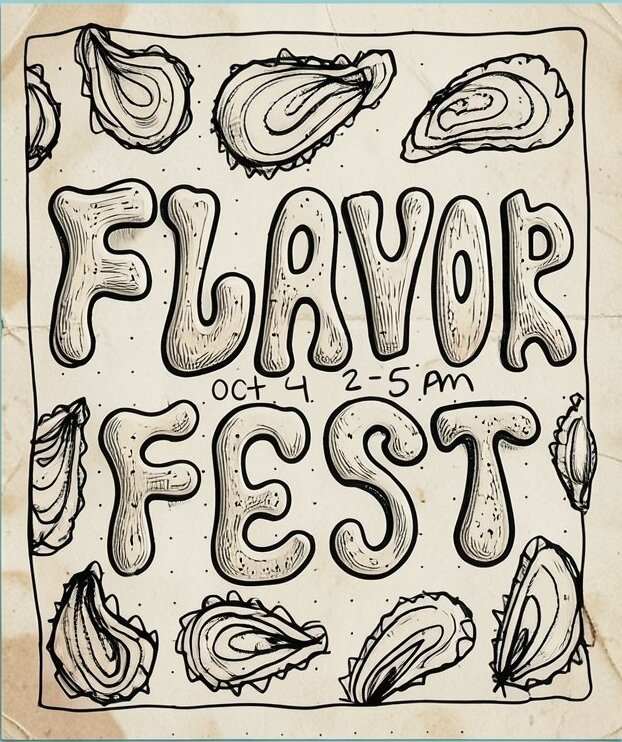
Krea · realtimeIt kept the layout and shaded the drawing. It added a wall we did not ask for, and the time now reads 2-5 AM.
Four tools · Krea · the passes
How the Krea image was made.
Pass 1asked Claude for a prompt
The sketch, and: I am designing a poster for a food festival in Charleston, SC. I am using Krea.ai realtime models for conceptual design. Help me come up with a prompt.
What came backfour prompts
A Lowcountry screenprint, Rainbow Row pastels, a hand-painted sign, and a risograph. Plus a warning: the model will not letter the date, so set it yourself.
Pass 2typed into Krea realtime
The sketch on the canvas, and a shorter prompt of our own: festival poster, lowcountry charleston, handrawn lettering, illustration, oysters
What came backone image
The drawing, shaded, on old paper against a blue wall. The time became 2-5 AM.
Four tools · Gemini
Gemini, and then the fix that was not.
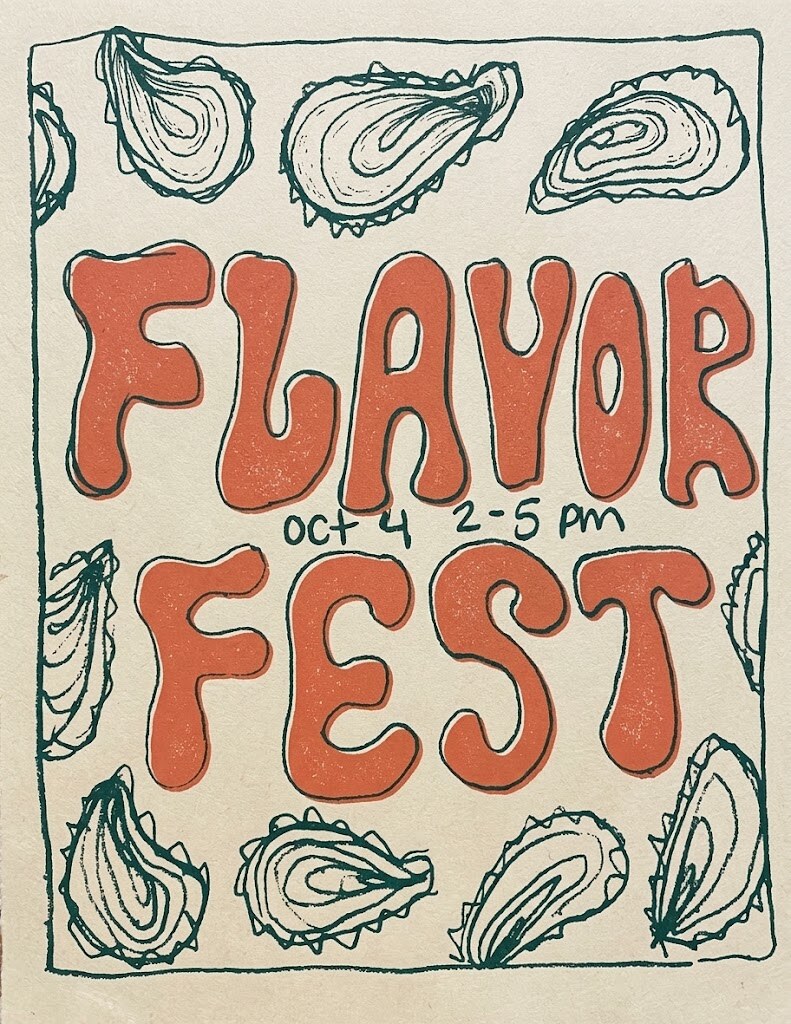
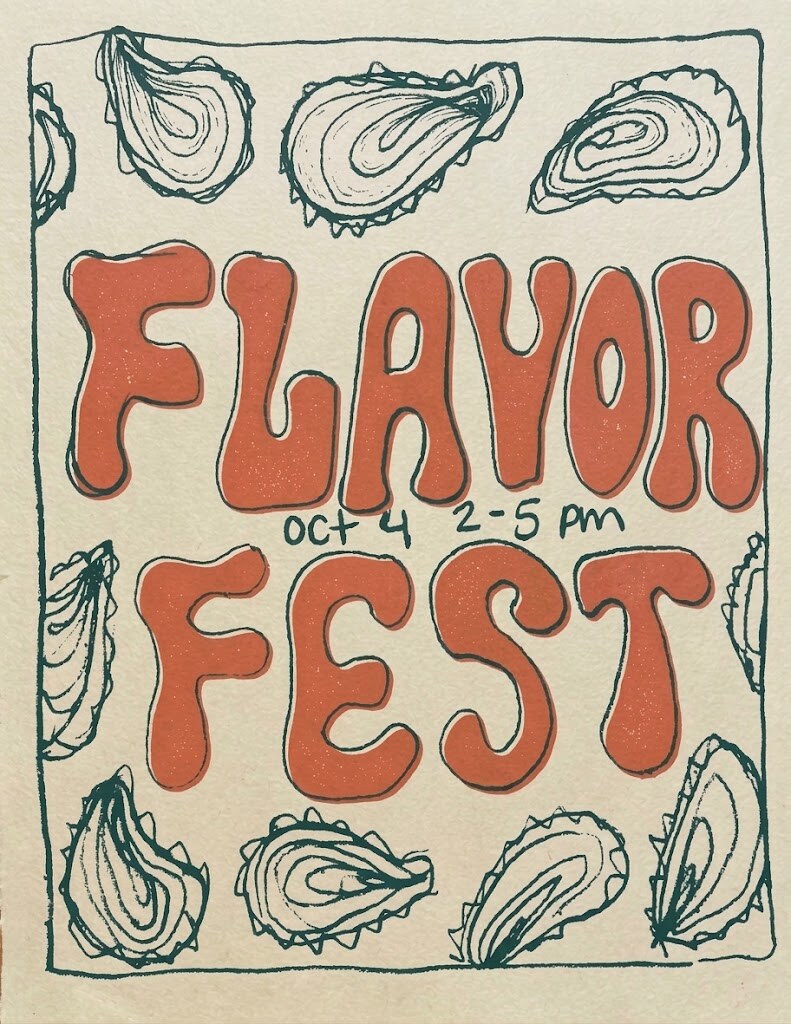
First try · one lineTwo inks on cream, close to the sketch. The letters still wobble in height and width.Asked to fix the letteringA long, careful prompt about cap height, baseline and stroke. About 3 percent of the picture changed. The letters did not.
Four tools · Gemini · the passes
How the Gemini images were made.
Pass 1Gemini
The sketch, and one line: Using the attached sketch as the exact layout, create a finished poster for a food festival in Charleston, South Carolina.
Pass 2asked Claude to fix it
The first poster, and: I like this direction but I want the inconsistencies in the lettering to be fixed. I still want to keep the hand-drawn aesthetic but I want this to be consistent lettering. Give me a new prompt based on this new asset.
Pass 3Gemini
The first poster, and Claude's prompt, on the next slide. About 3 percent of the picture changed. The letters did not.
Pass 4back to Claude
didn't clean up the lettering at all Claude's answer: erase the letters first, then draw new ones in a second step. Or redraw them by hand over a cap height and baseline guide, and use AI only for texture.
Four tools · Gemini · pass 3
The prompt that changed nothing.
Edit the attached poster. Keep everything except the lettering exactly as it is: the green oyster border, the frame line, the cream paper, the ink texture, the colors, and the overall layout.
Redraw "FLAVOR" and "FEST" as one consistent hand-drawn alphabet, as if a single sign painter drew every letter with the same tool on the same day:
- Every letter shares the same cap height and sits on a straight baseline, with FLAVOR and FEST at the same height as each other.
- Every stroke is the same thickness, with the same soft, rounded, slightly bulging 1970s bubble shape and the same round terminals.
- Letter widths feel related: the L is as sturdy as the F, the V matches the A, and both E's in the two words are identical.
- Counters (the holes in A, O, R) are similar in size and shape.
- Even spacing between letters, with both words centered and filling the same width.
- The R gets a proper leg that matches the style of the other letters.
Keep it hand-made: the coral fill with its speckled screenprint grain, the dark green outline slightly offset from the fill like misregistration, and a gently wobbly outline. Consistent does not mean digital or perfectly geometric.
Reletter "Oct 4 2–5 pm" in the same dark green, in small, neat hand lettering that matches the outline weight, centered between the two words.
Spell exactly: FLAVOR, FEST, Oct 4, 2–5 pm. No other text.
Four tools · ChatGPT
ChatGPT.
ChatGPT · one passThe same sketch and the same line as Gemini
The letterseven
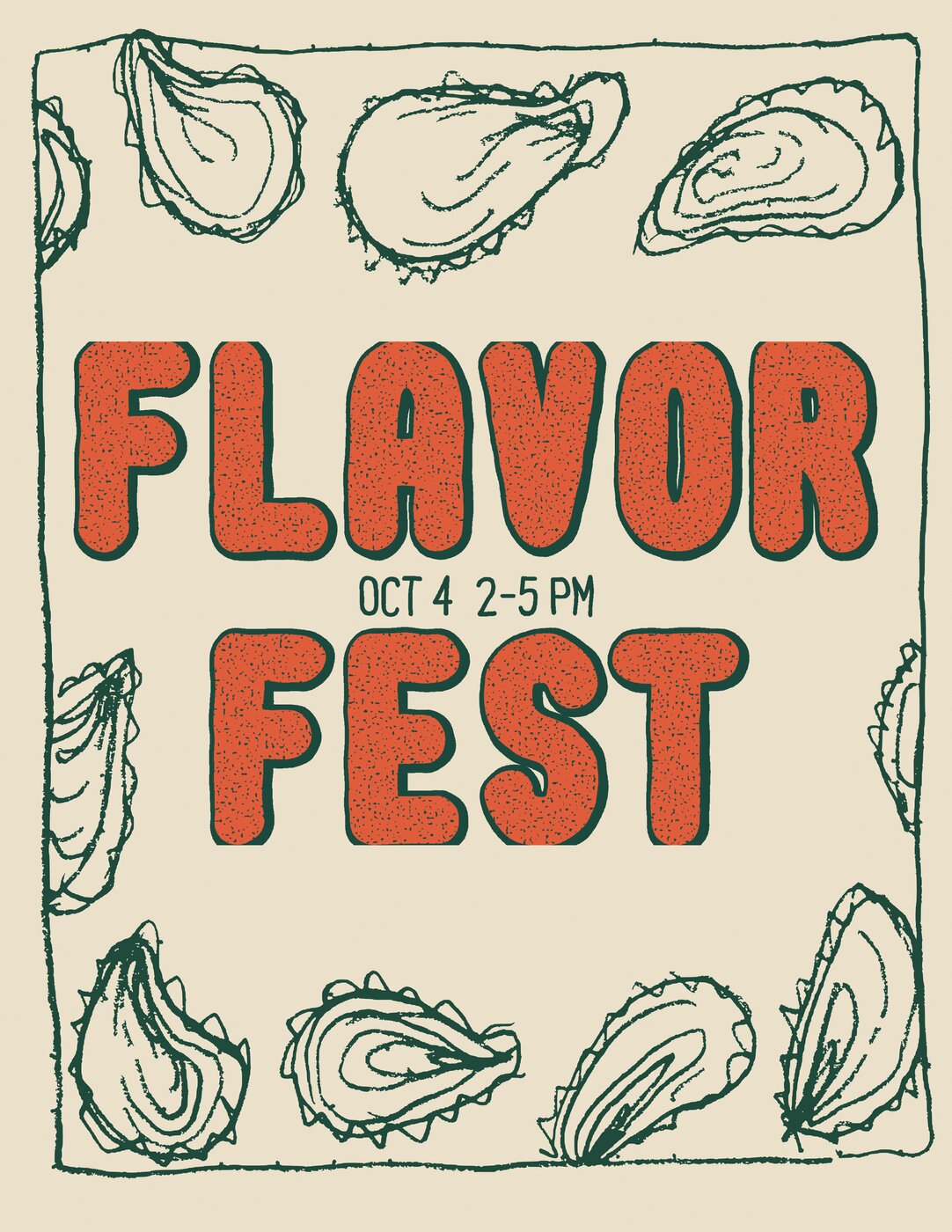
One height, one weight, one shape, on the first try. It swapped the colors: green letters, coral shadow.
The dateset in type
The handwritten date became a typeface. Correct, and it no longer looks drawn.
The oystersredrawn
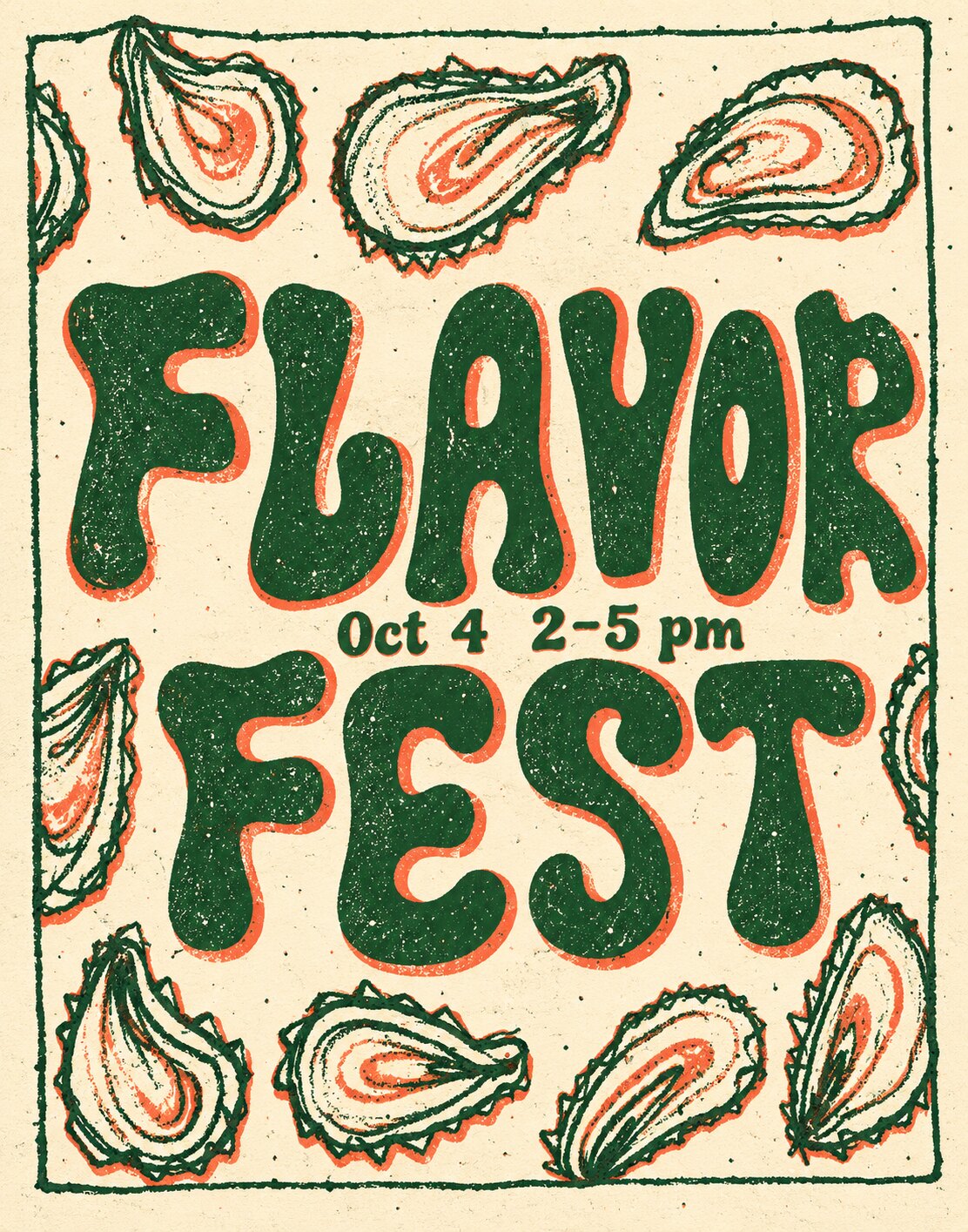
Same places as the sketch, but every oyster is new, with coral inside. None of them is the one the student drew.
Four tools · ChatGPT · the passes
How the ChatGPT image was made.
Pass 1ChatGPT
The sketch, and the same line as Gemini: Using the attached sketch as the exact layout, create a finished poster for a food festival in Charleston, South Carolina.
What came backone image
A finished two-color poster. No second pass.
Four tools · Claude
Claude.
Claude · built as vectorGreen and coral on cream
The oystersthe student's line
Scanned, cleaned to black and white, traced, and printed in green. Every oyster is the one the student drew.
The lettersone rule
Every letter drawn from the same stroke: same thickness, same height, same round ends. Then one slight wobble over all of them, so it still reads as hand-made.
The printtwo inks
The coral sits a little off the green outline, the way a screenprint does. Each color is its own layer, ready for a screen.
Four tools · Claude · the passes
How the Claude version was made.
The askthe same sketch
Run it through Claude too, after seeing that Gemini could not fix the letters.
1 · The scanblack and white
The thumbnail cleaned to pure black and white, the dot grid removed, then the student's letters erased so only the oysters and frame are left.
2 · The linetraced to vector
The oysters and frame traced into shapes and printed in green. The student's line, not a redrawing.
3 · The lettersone rule
Each letter drawn as a center line, then given the same thick stroke and round ends, so every letter matches by construction. One slight wobble over all of it.
4 · Three fixeslooked at, then changed
First version read as a stencil font, so the strokes got fatter. The grain ate the coral, so it got thinner. The V read as a U, so it got its point back. Then the date went up a size.
Four tools · side by side
Every one of them kept the student's layout.
The thumbnailKreacropped to the posterGeminiChatGPTClaude
THE OYSTER RING, THE STACKED WORDS AND THE DATE BETWEEN THEM CAME FROM THE THUMBNAIL. NONE OF THE TOOLS CHANGED THAT.
Work time
Then work, and I come to your desk.
Todaybefore you go
Exercise 5 handed in. If you are not finished on paper, the scan of what you have counts for today.
Tuesday Oct 6coloring and refining
Bring the layered file you colored today. The whole class is working time: color, shading, texture, refining.
Thursday Oct 8last class before the break
A poster you can print on letter paper and pin to the wall.
Thursday Oct 15critique
Project 2 due. Bring the original drawing as well as the print.
KEEP THE UNTOUCHED SCAN. IF THE FILE BREAKS, YOU START AGAIN FROM IT AND NOT FROM THE PAPER.
 wrkhrs.co